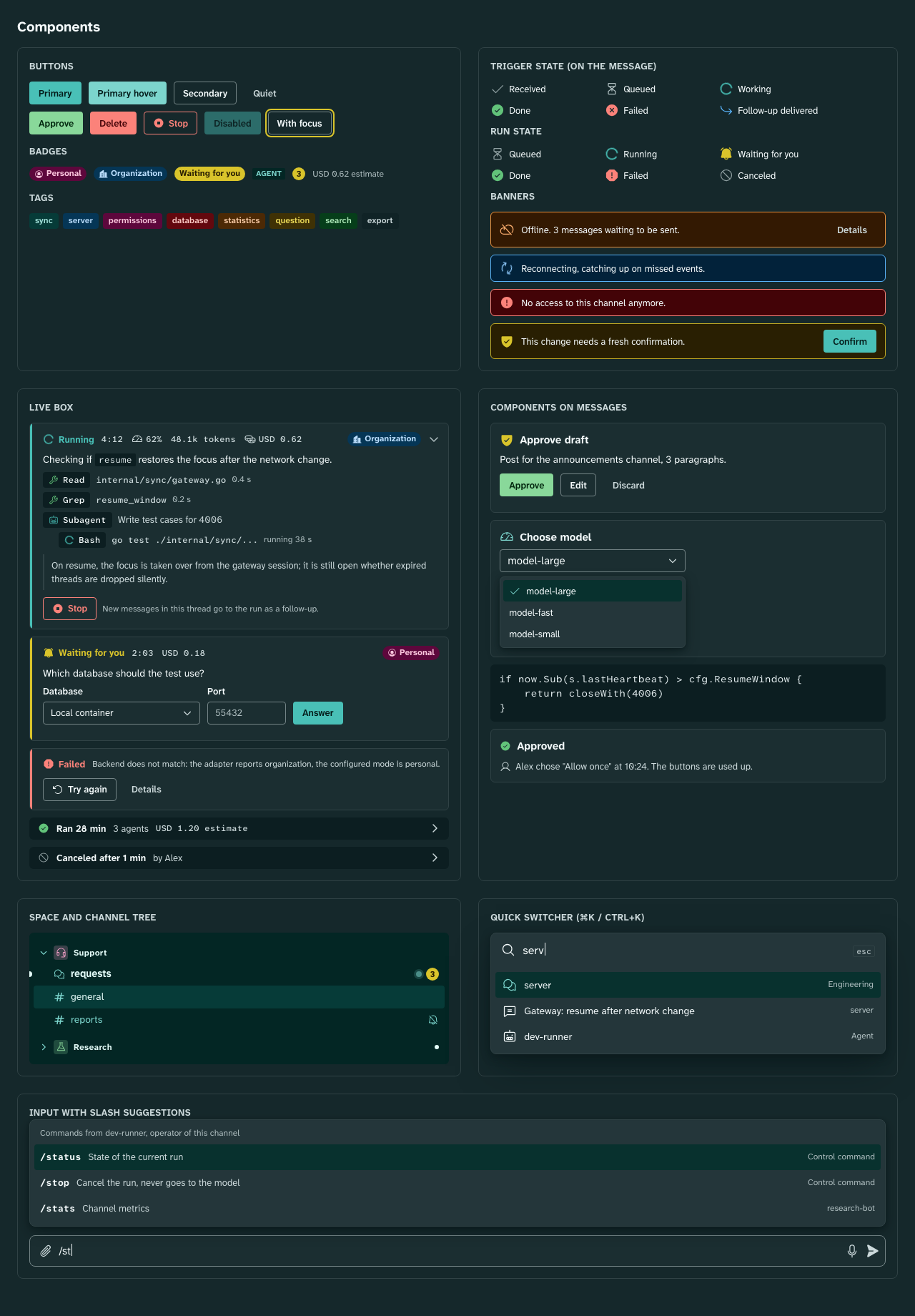
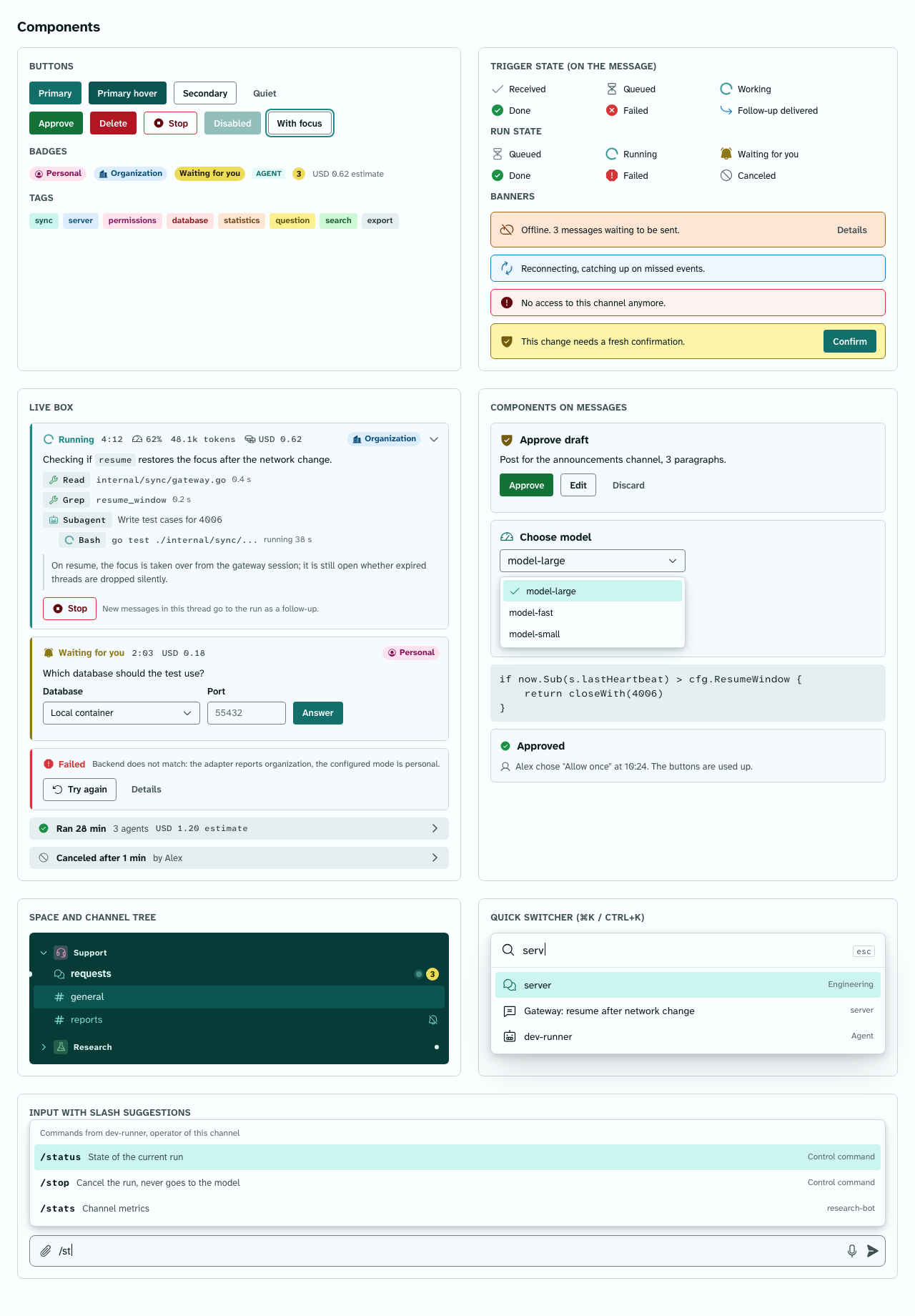
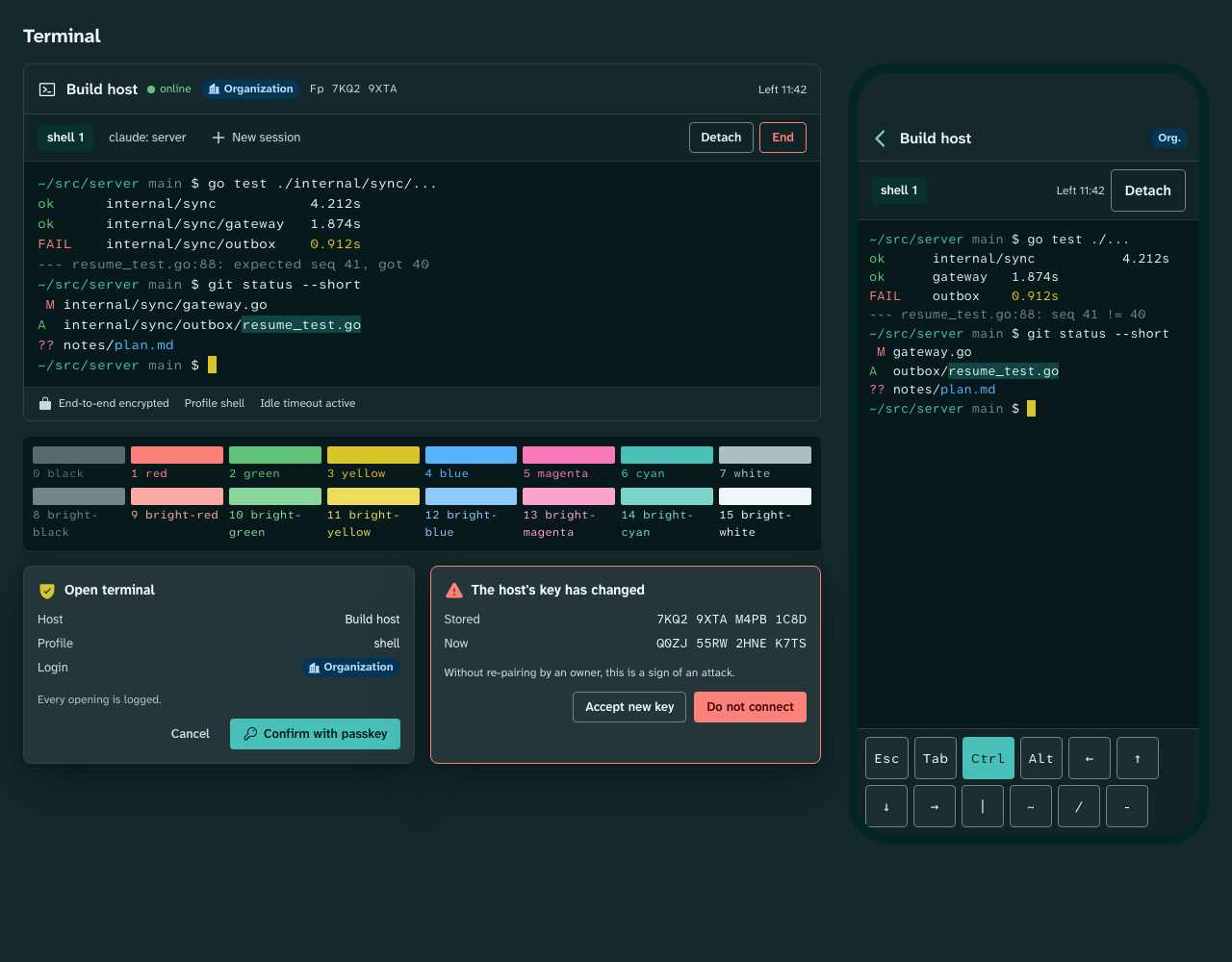
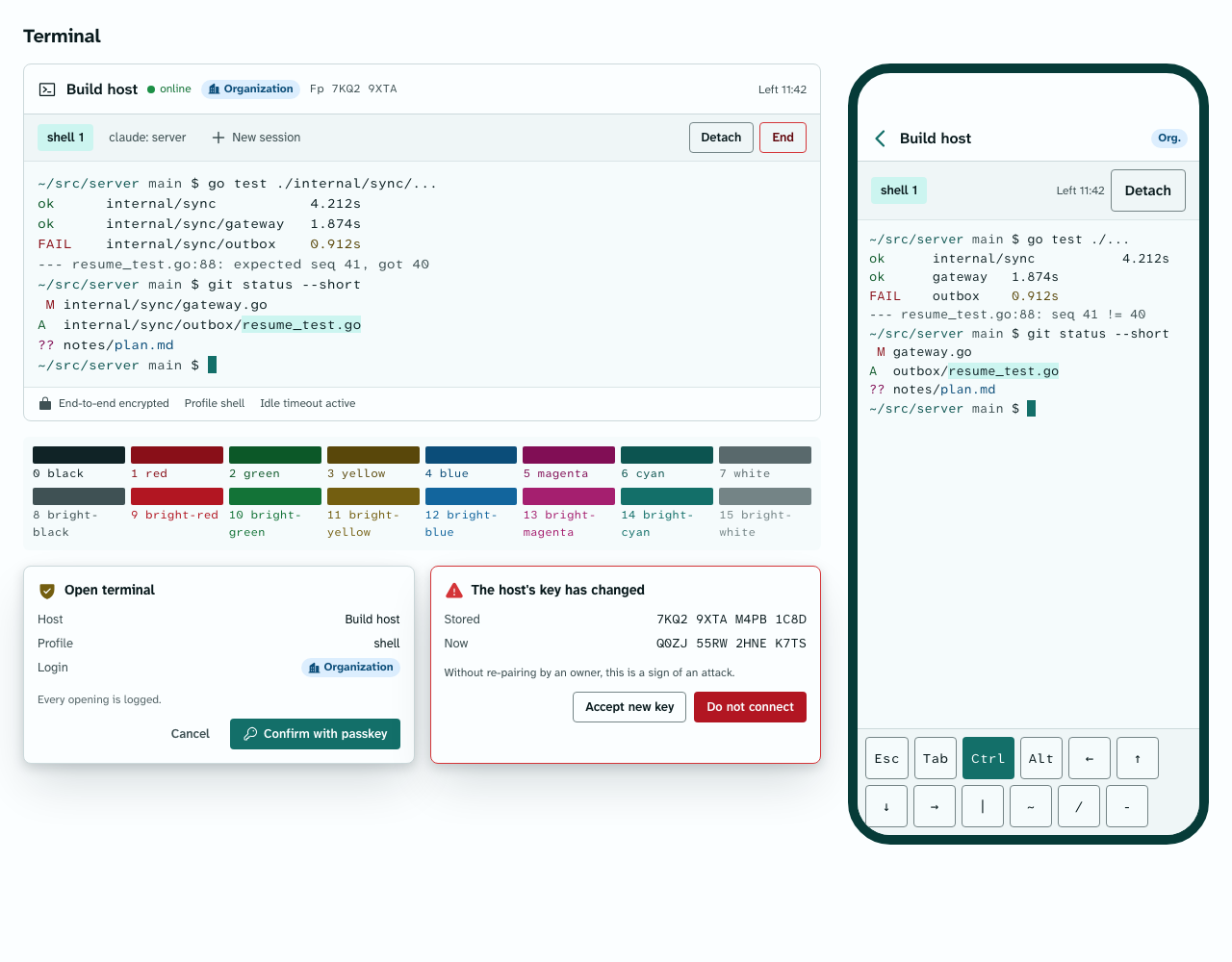
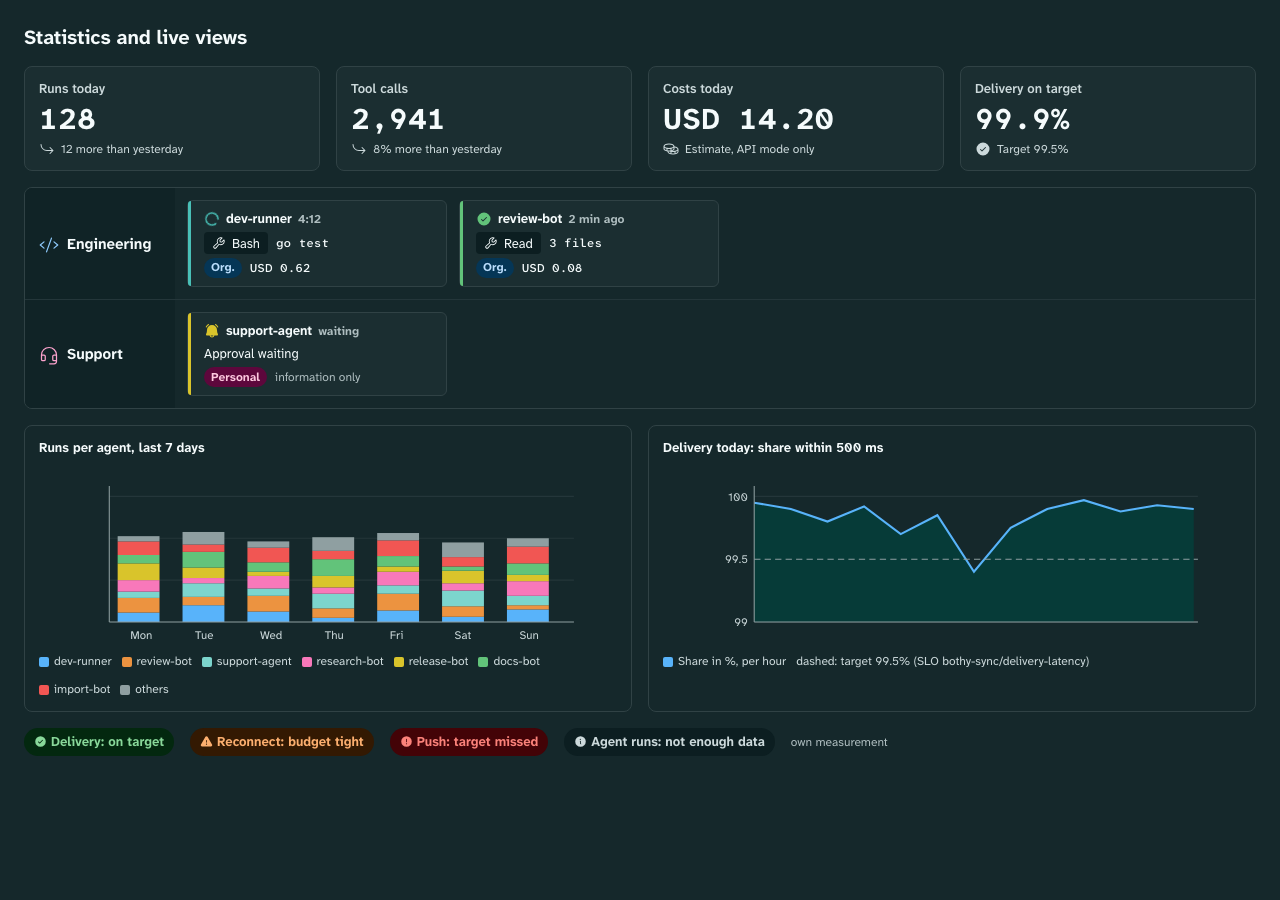
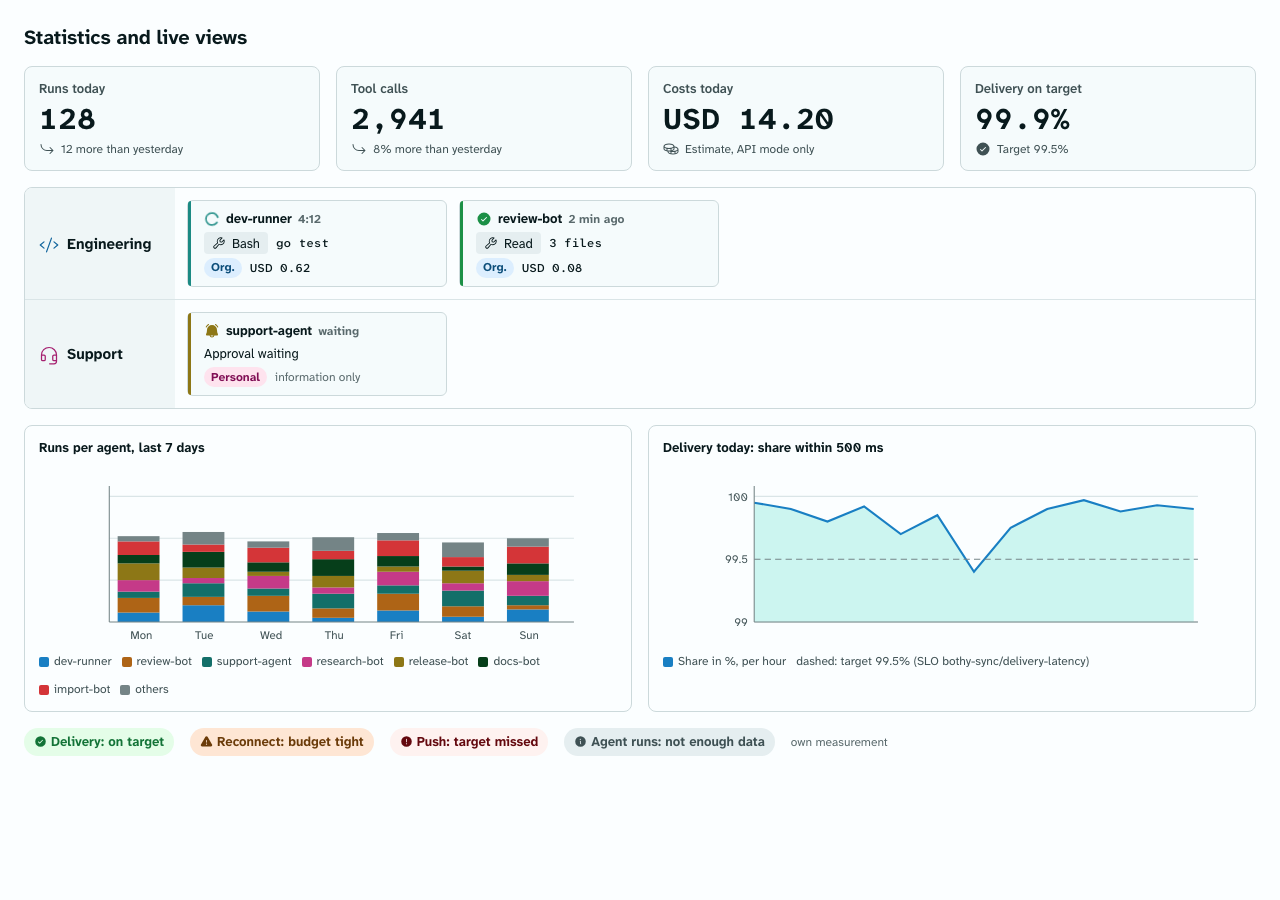
Status: draft M0. Specification of the core components for packages/design_system. Sizes and
colors only as token names; numbers in tokens.md and palette.md. Every
text or icon color on a surface is listed as a pairing in design/design-rules.json and checked in
contrast.md for light and dark. Images:
Components dark, light;
Terminal dark, light; Statistics
dark, light.
Data fields according to 03-data-model.md, events according to
04-sync-protocol.md.
Hit area at least density.target-min, even when the visible area is smaller.
Semantics: Every component sets role and label for screen readers (Flutter Semantics,
on the web as ARIA). Labels come from packages/l10n, never from the agent's data alone.
Never color alone: States differ in icon shape and text.
Motion only through motion.*; no motion in the reduced context.
Accent roles from DsAccent: components read color.accent.*, color.text.link,
color.focus.ring and color.run.running only from the theme extension DsAccent (Dart) or the
--ds-* variables under data-accent (web), never from DsColors, so the instance accent
(branding.accent_color) applies everywhere. Every variant is in contrast.md.
Purpose: a post in a thread (messages), from a person, agent, app, import or system.
Anatomy: avatar (person round, agent rounded square radius.md, app with a small badge),
header (name, for agents the badge "AGENT", timestamp, for triggering messages the
trigger state), content (Markdown), attachments, components (for kind = card), reactions,
reply reference (quote line above the content), hover bar (Reply, React, Edit,
Pin, More).
Variant
Data
Rendering
Text
kind = text
Markdown in type.body or density.message-font-size
Continuation message
same author within ui.message_group_window
without avatar and header; timestamp on hover
Voice message
kind = voice
play button, duration, progress; transcript below as soon as transcript_status = done
Live box anchor
kind = run
renders the live box (section 2) at this position
Card
kind = card
content plus components (section 8) in color.surface.raised
System
kind = system
one line in type.caption, color.text.secondary, icon on the left
Mentions me
me in mentions
tinted background color.attention.subtle, spine color.attention.border with border-width.spine
sending
entry in the outbox
reduced opacity, line "Sending" with the trigger.queued icon
failed
outbox, permanent error
line in color.danger.fg with the reason, buttons "Resend", "Edit", "Discard"
edited
edited_at set
suffix "(edited)" in color.text.muted; versions via message.revisions.read
deleted
deleted_at set
line "Message deleted" in color.text.muted; no hover bar
Long replies: content over ui.message_collapse_lines lines is collapsed; a text button
"Show more" (color.text.link) expands it. Code blocks in type.code on color.code.bg,
horizontally scrollable, with a copy button.
Sizes: avatar size.avatar-md; gap from avatar to content space.12; group gap
density.message-gap; row padding density.message-pad-y; reading width at most
layout.message-max-width.
Accessibility: A message is a semantics node with the label ",
Purpose: display of a run (runs) with state, metrics, status line, steps and
last text. It is pinned at the top of the thread while the run is active, and at the end it
collapses into one line.
Data: run document run_document.v1 (04, section 11): state, version, status_line,
last_text_excerpt, metrics (context_pct, tokens, subagents, background jobs,
API retries), cost, billing_mode_used, steps, followups. State changes arrive as the
durable run.state_changed, content as the ephemeral run.updated (only with focus).
Header: state icon and state word (run.*), run time, context in percent,
tokens, cost (all in type.code-sm), backend policy badge (section 10),
expand arrow.
Status line (section 4).
Steps: tool chips (section 3) in ordinal order, substeps indented
(parent_step_id). The last ui.livebox_visible_steps are visible; older ones are behind
"n earlier steps".
Last text:last_text_excerpt as a quote with a line on the left in color.border.default.
Footer: button "Stop" (variant danger-outline, icon action.stop), note about follow-ups.
For waiting_input, the form or the buttons of the question (section 8) instead of the note.
Stall: After run.stall_after without progress, a banner appears in
color.warning.* ("No progress for n minutes").
Surface color.surface.raised, border color.border.default, radius radius.md, padding
density.livebox-pad. Spine on the left in border-width.spine with the color of the state:
State
Spine and icon
Icon
Word
queued
color.run.queued
run.queued
"Queued"
running
color.run.running
run.running (spins)
"Running"
waiting_input
color.run.waiting
run.waiting
"Waiting for you" or "Waiting for Alex"
completed
color.run.completed
run.completed
"Done"
failed
color.run.failed
run.failed
"Failed" plus reason
cancelled
color.run.cancelled
run.cancelled
"Canceled"
Reasons (state_reason) are translated, never shown raw: billing_mode_mismatch ->
"Backend does not match", access_revoked -> "Access revoked", stale -> "Canceled after
stall", user_cancelled -> "Canceled by ", adapter_error -> "Error in the adapter",
cancel_timeout -> "Adapter did not confirm the cancellation", project_not_ready -> "Project
not ready". Unknown reasons: "Failed" plus the code in type.code-sm.
One line on color.surface.sunken, radius radius.md: icon, "Ran ", number of
tools, subagents, cost with "Estimate" as long as cost_is_estimate. The summary
comes from run.state_changed; expanding loads the document via REST (run.read). Study B
proposed the format "Ran 28 min · 3 agents · USD 1.20"; it is adopted.
Compact line below the navigation bar (height density.control-height plus padding):
state icon, state and run time, status line truncated to one line, stop button on the right with
hit area density.target-min. Tapping opens the full live box as a sheet. As built (M5-02): state
icon, state and run time wrap and the status line sits below them, so text scaling up to 200
percent loses nothing; the stop button stays at the top right of the line.
The live box is a semantics container with the label "Run of : , for ,
context percent".
Live region: only state changes and new questions are announced (polite), at most once
per a11y.live_announce_min_interval. Patches to steps and numbers are never announced; they
would flood screen readers.
The stop button has the label "Stop run of " and is reachable by a shortcut
(01-product.md, Keyboard shortcuts).
Anatomy: icon by kind (step.*), name (name, for example the tool name) in type.code-sm,
short description (title) in color.text.secondary, duration or "running n s". Surface
color.surface.sunken, radius radius.sm, height density.row-channel minus padding.
status
Icon color
Suffix
pending
color.run.queued
"waiting"
running
color.run.running, icon spins
run time
completed
color.run.completed
duration
failed
color.run.failed
"failed", detail on expand
cancelled
color.run.cancelled
"canceled"
Click or Enter opens detail (run_step_detail.v1) in a disclosure; contents are truncated
to run.step_detail_max_bytes. Label: ", , ".
One sentence on what the agent is doing right now (runs.status_line), in type.body-sm,
color.text.primary, one line, truncated at the end with a tooltip. Inline code allowed. Empty:
the line is omitted. Not part of the live region (see 2.4).
Purpose: state on the triggering message of a person (messages.trigger_state); replaces
the status emoji from Discord.
Placement: in the header of the message after the timestamp, size icon.size.sm. Tapping or
hovering shows the caption and jumps to the live box.
trigger_state
Icon
Color
Label (DE)
Label (EN)
received
trigger.received
color.trigger.received
Empfangen
Received
queued
trigger.queued
color.trigger.queued
In Warteschlange
Queued
working
trigger.working (spins)
color.trigger.working
Wird bearbeitet
Working
done
trigger.done
color.trigger.done
Erledigt
Done
failed
trigger.failed
color.trigger.failed
Fehlgeschlagen
Failed
cancelled
run.cancelled
color.run.cancelled
Abgebrochen
Canceled
followup_delivered
trigger.followup
color.trigger.followup
Nachtrag zugestellt
Follow-up delivered
For failed, the reason is in the tooltip and in the semantics label ("Failed: Project not
ready"). Messages without a trigger (trigger_state empty) show nothing. cancelled is a deliberate stop
(09 section 6): it uses the neutral run color, never the error style of failed, and names the
reason the same way ("Canceled: Canceled by Sam").
Purpose: dense list of the posts of a forum, sorted by last activity
(threads.last_activity_at) or by creation (forum_default_sort).
Row (height density.row-post, two lines):
on the left a state icon: active run (run.* from "Running now"), otherwise mention
(color.attention.fg), otherwise nothing;
title in type.body-sm, bold when unread; time on the right in type.caption;
second line: badge "Waiting for you" (color.attention.bg), operator agent,
mention counter, tags (category.<name>.chip-*), on error the reason in color.danger.fg.
States of the row: rest, hover (color.surface.hover), selected (color.surface.selected),
focus. Header: forum name, button "New post" (primary), filter chips (Open, Waiting for me,
Tags, Sort). At the bottom the done area: row "Done (n)", collapsed by default;
when expanded, done posts follow in color.text.muted.
Accessibility: list with the role "list", rows with the label "
, <State>, <Time>,
<n> unread". Arrow keys move, Enter opens.</p>
<h2 id="7-space-and-channel-tree">7. Space and channel tree<a class="headerlink" href="#7-space-and-channel-tree" title="Permanent link">¶</a></h2>
<p>Purpose: sidebar with spaces (<code>spaces</code>) and channels (<code>channels</code>), collapsible and sortable per
person (<code>user_space_states</code>).</p>
<p>Space row: arrow (<code>action.expand</code> or <code>action.collapse</code>), icon of the space from
<code>space-icons</code> in the category color (<code>category.<name>.on-sidebar</code>, on a lightly tinted
tile of the same color), name in <code>type.section</code>, <code>color.text.on-sidebar</code>. Collapsed with unread
items: dot on the right.</p>
<p>Channel row (height <code>density.row-channel</code>): icon by kind (<code>channel.text</code>, <code>channel.forum</code>), name in
<code>type.body-sm</code>.</p>
<table>
<thead>
<tr>
<th>State</th>
<th>Rendering</th>
</tr>
</thead>
<tbody>
<tr>
<td>read</td>
<td><code>color.text.on-sidebar-secondary</code></td>
</tr>
<tr>
<td>unread</td>
<td><code>color.text.on-sidebar</code>, bold, bar on the left</td>
</tr>
<tr>
<td>mentions</td>
<td>counter (<code>color.attention.bg</code>, <code>radius.pill</code>)</td>
</tr>
<tr>
<td>active run</td>
<td>run dot <code>category.spruce.on-sidebar</code> with pulse <code>motion.duration.pulse</code></td>
</tr>
<tr>
<td>muted</td>
<td><code>color.text.on-sidebar-muted</code>, icon <code>action.mute</code></td>
</tr>
<tr>
<td>selected</td>
<td><code>color.surface.sidebar-selected</code></td>
</tr>
<tr>
<td>hover</td>
<td><code>color.surface.sidebar-hover</code></td>
</tr>
<tr>
<td>focus</td>
<td>ring <code>color.focus.ring-on-sidebar</code></td>
</tr>
</tbody>
</table>
<p>Top: mark and product name (<code>branding.product_name</code>), quick switcher field ("Jump to" with a
shortcut), entry "Running now" with a counter. Bottom: own avatar, settings.</p>
<p>Behavior: collapse by click, Enter or arrow left/right; the state is synchronized via
<code>sidebar.update</code>. Dragging changes the personal order (<code>user_space_states.sort_key</code>); the
global order is changed only by <code>space.reorder</code> in the administration.</p>
<p>Accessibility: tree with the role "tree"; spaces are expandable nodes with the state
"collapsed" or "expanded"; channel label "<Name>, <n> unread, <m> mentions, run
active".</p>
<h2 id="8-components-on-messages-buttons-select-form">8. Components on messages (buttons, select, form)<a class="headerlink" href="#8-components-on-messages-buttons-select-form" title="Permanent link">¶</a></h2>
<p>Purpose: interactive elements of an agent or an app (<code>message_components</code>), for example
command approval ("Allow once", "For this session", "Always", "Deny"), model choice,
questions.</p>
<table>
<thead>
<tr>
<th>Type</th>
<th>Rendering</th>
</tr>
</thead>
<tbody>
<tr>
<td><code>button</code></td>
<td>button; style from <code>definition.style</code>: primary (<code>color.accent.bg</code>), success (<code>color.success.bg</code>), danger (<code>color.danger.bg</code>), secondary (border <code>color.border.control</code>), quiet</td>
</tr>
<tr>
<td><code>select</code></td>
<td>select field with a menu (<code>elevation.menu</code>), single or multiple selection</td>
</tr>
<tr>
<td><code>form</code></td>
<td>fields with the label above the field, submit button; validation against the schema of the component</td>
</tr>
</tbody>
</table>
<p>States (<code>message_components.state</code>):</p>
<table>
<thead>
<tr>
<th>State</th>
<th>Rendering</th>
</tr>
</thead>
<tbody>
<tr>
<td><code>active</code>, permitted</td>
<td>operable</td>
</tr>
<tr>
<td><code>active</code>, not permitted</td>
<td>visible, disabled, note with <code>security.lock</code>: "Only <Triggering person> or an owner can approve this" or "You do not have the permission 'Approve actions' for this"</td>
</tr>
<tr>
<td>sent, answer pending</td>
<td>the pressed button shows a loading icon; other buttons locked</td>
</tr>
<tr>
<td><code>used</code></td>
<td>all buttons gone; line "<Name> chose '<Choice>', <Time>" with <code>trigger.done</code></td>
</tr>
<tr>
<td><code>expired</code></td>
<td>line "Expired" in <code>color.text.muted</code></td>
</tr>
<tr>
<td><code>disabled</code></td>
<td>line "No longer available"</td>
</tr>
<tr>
<td>error</td>
<td>banner in <code>color.danger.*</code> with the reason; buttons operable again if the component is still <code>active</code></td>
</tr>
</tbody>
</table>
<p>Rules: One use is one interaction with a <code>client_interaction_id</code> from the outbox; a
double click creates no second one. A destructive choice ("Always") requires no second
confirmation, because it follows the permissions; the card does show, however, what "Always"
means. Buttons in a row, on mobile devices stacked at full width (image "Mobile"). On mobile
devices a form opens as a sheet over the keyboard (the card shows a button "Fill in") and a
select opens the system picker in a sheet (iOS: the wheel picker with "Submit"; Android: a list
whose tap on an option sends it); only a press on a button sends, never a swipe, drag or fling
(M5-02, <code>DsMessageComponents</code> with <code>stacked</code> and <code>sheets</code>).</p>
<p>Accessibility: group with a label from the card title; buttons in reading order; no shortcut
triggers an approval globally (accidental operation); Enter or Space only on the focused
button.</p>
<p>Header and texts (M4-07, SEC-OUT-4): above the agent text a framed header with
<code>security.step-up</code>, built only from server fields: "Request from <Agent>", "Run <Run>",
"Requires the permission '<Capability>'" and the approval note ("Only <Name> or an owner can
approve this", "Only an owner can approve this", "Anyone with access to this channel can
answer"). Below it a divider labeled "Text from <Agent>", then the agent text. While an answer is
pending the button reads "Sending your choice" to screen readers. Form fields show "Required",
"At most <n> characters" or "Enter a number"; a select without a choice shows "Choose"; a
component type the app does not know shows "This element needs a newer app".</p>
<h2 id="9-input-with-slash-suggestions">9. Input with slash suggestions<a class="headerlink" href="#9-input-with-slash-suggestions" title="Permanent link">¶</a></h2>
<p>Purpose: compose a message, commands (<code>commands</code>) with options and autocompletion,
mentions, attachments, voice recording.</p>
<p>Anatomy: field (surface <code>color.surface.input</code>, border <code>color.border.control</code>, radius <code>radius.lg</code>,
minimum height <code>density.composer-min-height</code>, grows up to <code>ui.composer_max_lines</code>), attachment on
the left, microphone and send on the right. Above it the "typing" line ("Sam is typing"), during an
active run the placeholder "Follow-up to <Agent>".</p>
<p>Suggestion list (overlay <code>color.surface.overlay</code>, <code>elevation.menu</code>): opens on "/" at the start of
a line and on "@". Rows (<code>density.row-suggestion</code>): command in mono, description,
origin (agent) and the hint "Control command" for <code>control = true</code>. Order: commands of the
operator of this channel first; equal names of other agents are qualified with the handle
(03-data-model.md, <code>commands</code>). After a command is selected, the input shows the options as
placeholders; options with <code>autocomplete</code> fetch suggestions through <code>command.autocomplete</code>,
throttled by <code>ui.autocomplete_debounce</code>. Mention suggestions show only people and agents that
the person may see.</p>
<p>States: empty, text, command selected, options incomplete (send disabled with a reason),
offline (sending goes to the outbox), no write permission (field replaced by the note "Read
only in this channel").</p>
<p>Keyboard: arrows select, Tab or Enter accepts, Escape closes; Enter sends, Shift+Enter
makes a new line (reversible through <code>composer.enter_sends</code>); arrow up in the empty field edits
your own last message.</p>
<p>Accessibility: field with the label "Message to <channel or thread>"; suggestion list as a listbox
with an active entry; the number of suggestions is announced.</p>
<p>Texts (M4-07): two or more people typing read "Several people are typing"; offline shows
"Offline: your message waits in the queue" with <code>state.offline</code>; incomplete options show
"Missing option: <Option>" with <code>state.warning</code> above the field; the buttons read "Send",
"Attach file" and "Record voice message".</p>
<h2 id="10-backend-policy-badge">10. Backend policy badge<a class="headerlink" href="#10-backend-policy-badge" title="Permanent link">¶</a></h2>
<p>Purpose: shows in the thread header, live box and agent card what the agent runs on
(<code>agents.billing_mode</code>, baseline section 5).</p>
<table>
<thead>
<tr>
<th>Mode</th>
<th>Icon</th>
<th>Color</th>
<th>Text</th>
</tr>
</thead>
<tbody>
<tr>
<td><code>personal</code></td>
<td><code>billing.personal</code></td>
<td><code>color.badge.personal-bg</code>, <code>-fg</code></td>
<td>"Personal"</td>
</tr>
<tr>
<td><code>organization</code></td>
<td><code>billing.organization</code></td>
<td><code>color.badge.organization-bg</code>, <code>-fg</code></td>
<td>"Organization"</td>
</tr>
</tbody>
</table>
<p>Height <code>size.badge-height</code>, radius <code>radius.pill</code>, text <code>type.label</code>. If the reported mode
(<code>reported_billing_mode</code>) differs from the configured mode, the agent card also shows a warning
badge (<code>color.warning.*</code>, "Reported: Organization"); runs then fail with <code>billing_mode_mismatch</code>.
Costs for <code>organization</code> carry the suffix "Estimate" until reconciled; for <code>personal</code> the suffix "for
information only". Label: "Backend: Personal, runs on the subscription of <Name>".</p>
<h2 id="11-visualizations-bothy_viz">11. Visualizations (<code>bothy_viz</code>)<a class="headerlink" href="#11-visualizations-bothy_viz" title="Permanent link">¶</a></h2>
<p>Purpose: basic forms for the views from <a href="../../spec/25-visualization/">25-visualization.md</a> in
apps and console; the Grafana panel uses the same roles through the TypeScript output of the tokens.</p>
<table>
<thead>
<tr>
<th>Basic form</th>
<th>Appearance</th>
<th>Tokens</th>
</tr>
</thead>
<tbody>
<tr>
<td>Lane (space)</td>
<td>row with a header on the left (category color and icon of the space), line <code>color.viz.grid</code> between lanes</td>
<td><code>color.border.*</code>, <code>space.*</code></td>
</tr>
<tr>
<td>Run card</td>
<td>like a collapsed live box: spine on the left in the state color of the run, agent, tool chip (section 3), backend policy badge (section 10), cost in mono</td>
<td>roles of the live box, <code>type.code</code></td>
</tr>
<tr>
<td>Metric tile</td>
<td>large number in mono, label above it, comparison with the previous period as text with an icon (never only color)</td>
<td><code>type.display</code>, <code>type.label</code></td>
</tr>
<tr>
<td>Area and bar</td>
<td>series in <code>color.viz.series.1</code> to <code>.8</code> in a fixed order; axes <code>color.viz.axis</code>; fill <code>color.viz.area-fill</code>; guide lines <code>color.viz.grid</code></td>
<td><code>color.viz.*</code></td>
</tr>
<tr>
<td>SLO traffic light</td>
<td>dot with icon and text "on target", "budget tight", "target missed", "not enough data" and the label "own measurement"</td>
<td><code>color.success.*</code>, <code>color.warning.*</code>, <code>color.danger.*</code>, neutral role for "not enough data"</td>
</tr>
<tr>
<td>Timeline</td>
<td>playhead as a vertical line, controls with icons from <code>icon.tokens.json</code></td>
<td><code>motion.*</code></td>
</tr>
</tbody>
</table>
<p>Rules:</p>
<ul>
<li>No gradient, no glow, no 3D look (ban list in <a href="../">README.md</a>).</li>
<li>Every basic form has semantics and a table view with the same values.</li>
<li>The roles <code>color.viz.*</code> are in the tokens; series and axis are checked against <code>surface.canvas</code>,
<code>surface.list</code> and <code>surface.raised</code> with contrast <code>ui</code> in both themes
(<a href="../contrast/">contrast.md</a>). <code>grid</code> and <code>area-fill</code> carry no information alone and therefore
have no contrast requirement. The order of the series starts with blue and orange, which stay
distinguishable with red-green color blindness; a second feature (label or pattern) is
still required. <code>make tokens</code> also checks every adjacent pair of series (1 with 2 up to 7
with 8, and 8 with 1 because the order wraps when a view needs more than eight groups) under
simulated protanopia, deuteranopia and tritanopia: the OKLab distance of the simulated colours
must reach <code>cvd_min_delta_e_ok</code> of <code>design/design-rules.json</code> (section "Color vision
deficiency" of <a href="../contrast/">contrast.md</a>).</li>
<li>The SLO traffic light uses only <code>color.success.*</code>, <code>color.warning.*</code> and <code>color.danger.*</code>; the
same check holds <code>success.fg</code>, <code>warning.fg</code> and <code>danger.fg</code> pairwise apart by
<code>cvd_min_delta_e_ok</code>, and every state carries an icon and text as well.</li>
<li>TV mode: dark theme, density <code>comfortable</code>, font sizes one step larger; no motion in the
<code>reduced</code> context.</li>
</ul>
<h2 id="12-terminal-view">12. Terminal view<a class="headerlink" href="#12-terminal-view" title="Permanent link">¶</a></h2>
<p>Purpose: shows a terminal session on a connected host
(<a href="../../spec/24-terminal/">24-terminal.md</a>); screens D11 (desktop and console) and M8 (phone) in
<a href="../../spec/01-product/">01-product.md</a>. Package <code>packages/terminal_ui</code>, renderer <code>xterm</code> (PLAN M4-35).</p>
<table>
<thead>
<tr>
<th>Part</th>
<th>Appearance</th>
<th>Tokens</th>
</tr>
</thead>
<tbody>
<tr>
<td>Header</td>
<td>icon <code>terminal-window</code>, host name (<code>type.heading</code>), connection as a dot with text, LLM login badge (section 10), start of the fingerprint in mono, remaining time as text</td>
<td><code>color.text.*</code>, <code>color.badge.*</code>, <code>font.family.mono</code></td>
</tr>
<tr>
<td>Tabs</td>
<td>one tab per own session on the host; selected like a selected row; on the right "Detach" (secondary) and "End" (danger, outlined)</td>
<td><code>color.surface.selected</code>, buttons</td>
</tr>
<tr>
<td>Screen</td>
<td>surface <code>color.terminal.bg</code>, text <code>color.terminal.fg</code> in <code>font.family.mono</code> with the size from <code>type.code</code>, adjustable separately (01, section 8); cursor as a block <code>color.terminal.cursor</code> with the character in <code>color.terminal.cursor-text</code>; selection <code>color.terminal.selection-bg</code></td>
<td><code>color.terminal.*</code></td>
</tr>
<tr>
<td>ANSI colors</td>
<td>SGR 30 to 37 and 90 to 97 map to <code>color.terminal.ansi.<name></code> and <code>color.terminal.ansi.bright-<name></code>; the renderer shows 256 colors and truecolor unchanged, because the program chooses them</td>
<td><code>color.terminal.ansi.*</code></td>
</tr>
<tr>
<td>Footer</td>
<td>"End-to-end encrypted" with a lock icon, profile, "Idle timeout active"</td>
<td><code>type.caption</code>, <code>color.text.secondary</code></td>
</tr>
<tr>
<td>Extra keys bar (mobile)</td>
<td>keys Esc, Tab, Ctrl, Alt, arrows, vertical bar, <code>~</code>, <code>/</code>, <code>-</code> with height <code>density.control-height</code>; a latched modifier is filled in <code>color.accent.bg</code> with <code>color.text.on-accent</code></td>
<td>button roles, <code>density.*</code></td>
</tr>
<tr>
<td>Confirmation on opening</td>
<td>dialog with host, profile and badge; main button "Confirm with passkey" or device key; note "Every opening is logged"</td>
<td><code>elevation.dialog</code>, <code>color.surface.overlay</code></td>
</tr>
<tr>
<td>Key change warning</td>
<td>dialog with border <code>color.danger.border</code>, old and new fingerprint in mono; the danger button "Do not connect" is the main action</td>
<td><code>color.danger.*</code></td>
</tr>
<tr>
<td>States</td>
<td>connected, detached (banner <code>info</code> with "Reattach"), ended (reason as text, screen stays readable), blocked by revocation (banner <code>danger</code>)</td>
<td>banner roles</td>
</tr>
</tbody>
</table>
<p>Rules:</p>
<ul>
<li>The roles <code>color.terminal.*</code> apply only in the screen of the terminal. Header, tabs, dialogs and
bars follow the theme of the app.</li>
<li>Contrast: default text and the twelve chromatic colors as well as bright black (ANSI 8, often for
dimmed text) reach <code>text</code> against <code>color.terminal.bg</code>; the grays at the ends (ANSI 0, 7, 15) and
the cursor reach <code>ui</code>. Reason: programs use these three grays as background or
border; full text contrast is not possible in both themes for all three at once. All
pairings are in <code>design/design-rules.json</code> and in <a href="../contrast/">contrast.md</a>.</li>
<li>No glow, no scanline effect, no imitation of old screens.</li>
<li>Motion: the cursor blinks only in the <code>full</code> context of <code>motion.*</code>; in the <code>reduced</code> context it
stays still.</li>
<li>Semantics: the line at the cursor and, on command, the visible screen are readable; running output
is not read aloud (01, section 8). Extra keys carry labels ("Control, latched").</li>
<li>Golden tests in light and dark with warning, detached and extra keys bar (M4-35).</li>
</ul>
<h2 id="13-review-list-not-automatically-checkable">13. Review list (not automatically checkable)<a class="headerlink" href="#13-review-list-not-automatically-checkable" title="Permanent link">¶</a></h2>
<ul>
<li>No glass, blur or glow effects; no gradients.</li>
<li>No floating cards with a large shadow; shadows only from <code>elevation.*</code>.</li>
<li>No welcome banner, no terminal look in chat and administration (the terminal view in
section 12 is a separate component), no decorative illustrations.</li>
<li>No emoji in UI texts or as an icon; status never as a reaction.</li>
<li>Every new color is a role with a pairing in <code>design/design-rules.json</code>.</li>
<li>Golden tests in light and dark, in <code>comfortable</code> and <code>touch</code>, with text scaling 1 and 2
(15-client-architecture.md, Test strategy).</li>
</ul>
<h2 id="14-configuration-values">14. Configuration values<a class="headerlink" href="#14-configuration-values" title="Permanent link">¶</a></h2>
<p>The values <code>ui.*</code> and <code>a11y.*</code> that this page names are listed with their defaults in
<a href="../../spec/01-product/">01-product.md</a>, section "Configuration values of this chapter".</p>
</article>
</div>
<script>var target=document.getElementById(location.hash.slice(1));target&&target.name&&(target.checked=target.name.startsWith("__tabbed_"))</script>
</div>
<button type="button" class="md-top md-icon" data-md-component="top" hidden>
<svg xmlns="http://www.w3.org/2000/svg" viewBox="0 0 24 24"><path d="M13 20h-2V8l-5.5 5.5-1.42-1.42L12 4.16l7.92 7.92-1.42 1.42L13 8z"/></svg>
Back to top
</button>
</main>
<footer class="md-footer">
<div class="md-footer-meta md-typeset">
<div class="md-footer-meta__inner md-grid">
<div class="md-copyright">
Made with
<a href="https://squidfunk.github.io/mkdocs-material/" target="_blank" rel="noopener">
Material for MkDocs
</a>
</div>
</div>
</div>
</footer>
</div>
<div class="md-dialog" data-md-component="dialog">
<div class="md-dialog__inner md-typeset"></div>
</div>
<script id="__config" type="application/json">{"annotate": null, "base": "../..", "features": ["content.code.copy", "navigation.indexes", "navigation.sections", "navigation.top", "search.highlight", "toc.follow"], "search": "../../assets/javascripts/workers/search.2c215733.min.js", "tags": null, "translations": {"clipboard.copied": "Copied to clipboard", "clipboard.copy": "Copy to clipboard", "search.result.more.one": "1 more on this page", "search.result.more.other": "# more on this page", "search.result.none": "No matching documents", "search.result.one": "1 matching document", "search.result.other": "# matching documents", "search.result.placeholder": "Type to start searching", "search.result.term.missing": "Missing", "select.version": "Select version"}, "version": null}</script>
<script src="../../assets/javascripts/bundle.d7400e89.min.js"></script>
</body>
</html>