Moving to another target
Status: draft M0. Runbook for 16-operations.md 11. Applies to every move: Mac to Linux VM, VM to cloud, cloud to cloud, container database to managed service.
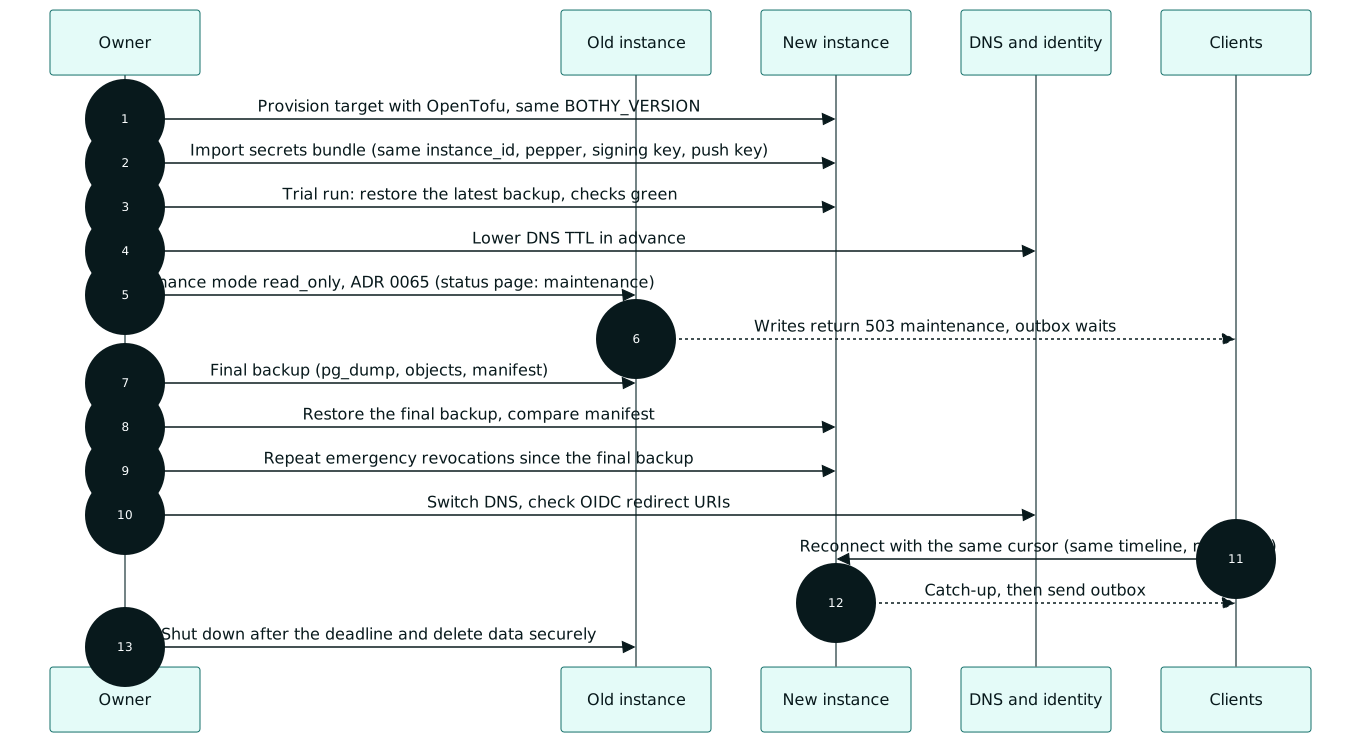
1. Principle
A move is a restore without data loss: in maintenance mode the old instance accepts nothing more,
its last state moves completely. Therefore the sync epoch stays the same, and
clients continue with their cursor. instance_id, token pepper and signing key move along;
so tokens, devices and invocation tokens stay valid. bothy restore finalize --relocation proves
on the target that nothing was lost (section 3 step 4) before it keeps the epoch.
A move to a managed PostgreSQL service with automatic failover: a failover raises the timeline,
and the start lock holds the server not ready until bothy restore finalize ran
(disaster-recovery.md, case G). Set database.restore_guard = off only
where the provider documents that a failover loses no committed transaction; otherwise a failover
is handled like a restore with a new epoch (16-operations.md 8.4).
2. Preparation (days before)
- Provision the target with OpenTofu (infra/tofu/README.md), same
BOTHY_VERSIONas the old instance. On a VM target the modulegeneric-vmsets up the host and runs the setup wizard; its inputbothy_versionis the product release whose bundle pins that server version (infra/tofu/modules/generic-vm/README.md). The wizard generates fresh secrets on the target; step 2 replaces them with the bundle of the old instance before the first start of the restored data. On Hetzner Cloud, AWS and Azure the moduleshetzner,awsandazurecreate the network (only the edge port public, SSH fromssh_allowed_cidrs) and the host and then callgeneric-vm(infra/tofu/README.md). Point the DNS name at the address in the outputssh_endpointonly in step 7 of section 3. The off-site bucket of the target (created byawswithoffsite_region, by hand on Hetzner, elsewhere for Azure) gets its keys by hand, as the module READMEs describe; until then the target backs up locally only. - Load the secrets bundle. Push keys and app identity stay the same; push registrations of the devices therefore stay valid.
- Trial run: restore the latest backup of the old instance on the target (backup-restore.md 5.3), restore test green, measure the duration. The measured duration plus a buffer is the maintenance window.
- Lower the DNS TTL of the hostname, at least one old TTL before the move.
- Prepare identity:
- OIDC: register the redirect URIs of the new host with the provider (in addition, not instead).
- Passkeys are bound to the domain (RP ID). The same domain keeps them; a new domain means: register passkeys again, device keys stay valid.
- Tailscale: prepare a new device with the same
TS_HOSTNAME, but not yet as the target of the name.
- Status page: announce the maintenance (
status_incidents.kind = maintenance).
3. Move (in the maintenance window)
-
Old instance:
server.maintenance_mode = read_only, restartapiandworker(ADR 0065). Writing actions get503with codemaintenanceandRetry-After; apps keep their outbox. Exceptions (ADR 0065, item 4):- Responses of ongoing runs: an agent with a run in
runningmay continue to sendrun.update,run.finish,agent.heartbeatandack, plus messages and files in the thread of this run.run.startis blocked; runs inqueuedandwaiting_inputwait and move along. - Token refresh issues new access tokens without rotating the refresh token.
- Emergency revocations stay possible:
auth.step_up,session.revoke,device.revoke,token.revoke,user.disableand the revocation of a refresh family on reuse. - Deliveries (
push,webhooks) and the jobruns.cancel_timeoutkeep running in theworker; all other queues and periodic jobs pause.
As built (M7-08): check the mode before step 3.
getStatusshows every component andoverall_stateasmaintenance, a write such ascreateMessageanswers503with codemaintenanceand theRetry-Afterofserver.maintenance_retry_after, and the metricbothy.maintenance.rejectedcounts the refused requests per action. The web console stays logged in (its idle clock still writes), but a new login is a write and is refused, so keep a console or app session of the owner open for emergency revocations. The target starts withserver.maintenance_mode = off: a copied configuration withread_onlywould answer every write there with503 maintenanceafter the switch. The commands (bothy migrate,bothy restore,bothy setup) do not read the mode. - Responses of ongoing runs: an agent with a run in
-
Wait until no runs are active ("Running now" empty). If they run too long, the owner cancels them (
run.cancel); afteragent.cancel_gracethe server sets them tocancelleditself. - Final backup:
pg_dump, object backup, manifest. Note the point in time: every emergency revocation after it is missing on the target. - Target: restore of the logical dump and of the objects; compare the manifest (row counts,
head_seq, audit head, file count). A difference means: abort, make the old instance writable again. Then save the manifest of the final backup (backup_runs.manifestof that run on the old instance) asmanifest.jsonnext to the Compose file and rundocker compose run --rm -v ./manifest.json:/tmp/manifest.json:ro migrate restore finalize --relocation /tmp/manifest.json(themigratecontainer is read-only and sees only its secrets, so the file is mounted): it comparesevent_log.head_seq,audit.last_seq,audit.last_hashandsync_epochwith the restored database and stores the identity of the new cluster, keeping the epoch and every cursor. The target runs on a new cluster, so without this step it stays not ready (restore_not_finalized, 16-operations.md 8.4). Exit1names the differing field and changes nothing: abort as above, or, if the target must go live with what it has, runbothy restore finalizewithout the option (new epoch, clients reload). - Start the target, restore test by hand, smoke tests (16-operations.md 11.1).
- Repeat on the target the emergency revocations that happened on the old instance after the final backup (audit log of the old instance from the noted point in time on).
- Switch DNS or the Tailscale name.
- Stop the old instance (do not delete it).
4. After the move
- Push notifications and webhooks that the old instance delivered after the final backup
may be delivered a second time by the target (at least once, same
webhook-id). - Clients reconnect, continue with their cursor and send their outbox.
- Agent adapters reconnect with their consumer; their
acked_seqhas moved along. - Check: status page green, SLO dashboards without a drop, first backup on the target and first automatic restore test successful.
- Remove the old redirect URIs at the OIDC provider.
- Delete the old instance after a period that the owner sets (volumes, backups of the old target after their retention period).
5. New hostname
If the hostname changes, the apps do not know the new address. Until chapter 06 defines a way,
the following applies: people enter the new address; the login stays valid if
instance_id and signing key are the same. Planned is a hint moved_to in
instance.discovery.read of the old instance, signed with the instance key; the app accepts
it only with the same instance_id (question for team B).
6. Switching between container database and managed service
- To the managed service: as above, restore of the logical dump into the service. The OpenTofu
module creates the roles.
bothy-backupdthen runs without pgBackRest. As built (M7-16): not possible yet. Amazon RDS and Azure Database for PostgreSQL offer PostgreSQL 18, butinstall.shand the Compose stack cannot use an external database, so the modulesawsandazurerefusedatabase_mode = managed(docs/DECISIONS.md D-M7-16-4). - Back: as above, into a container database; immediately afterwards a full backup with pgBackRest.